MTS Hijyen

B2B shopping platform for corporate cleaning and hygiene solutions.

Categories

  • Paper Products
  • Cleaning Chemicals
  • Kitchen, Dishwashing & Food Service
  • Dispensers
  • Cleaning Equipment
  • Personal Care & Protective Equipment
  • Waste Management & Ambient Care

Brands

  • Wanda Soft
  • Efor
  • Selpak
  • Belinno
  • Beybi
  • Bingo
  • Ceymop

Company

  • About Us
  • Product Groups
  • Bundles
  • Deals
  • Blog
  • Contact

Help

  • Help Center
  • Portal Guide
  • Request a Quote
  • Request Sample
  • Returns

Legal

  • Privacy Notice
  • Privacy Policy
  • Cookie Policy
  • Distance Sales Agreement
© 2026 MTS Hijyen. All rights reserved.
+90 (543) 683 5765·Corporate lineNationwide deliveryMon-Fri 08:00-18:00
BundlesDeals|HelpAbout Us|Request a quote
MTS Hijyen
Sign InSign Up
Loading...
Choose a chapter:5. Quotes and samples
  1. 1Setting up your account
  2. 2Finding products
  3. 3Placing an order
  4. 4Recurring orders
  5. 5Quotes and samples
  6. 6Approvals and budget
  7. 7Payment and finance
  8. 8After the order
  9. 9Team management
  10. 10Benefits
  11. 11Dealer managementFor dealers
  1. 1Setting up your account
  2. 2Finding products
  3. 3Placing an order
  4. 4Recurring orders
  5. 5Quotes and samples
  6. 6Approvals and budget
  7. 7Payment and finance
  8. 8After the order
  9. 9Team management
  10. 10Benefits
  11. 11Dealer managementFor dealers
Chapter 5 / 11
HomeGuideQuotes and samples

Quotes and samples

Request a price quote and try products as samples before you buy.

What it is for: Helps you get special prices on large quantities and test a product first.

Steps

  1. 1

    Add products to the quote list

    Click Get a Price Quote on a product page. The quantity you chose is added to your quote list. When you send the list, a price made for you is prepared.

My Price Quotes page
  1. 2

    Create a quote request

    On the My Price Quotes page, click New Quote Request and fill in the form.
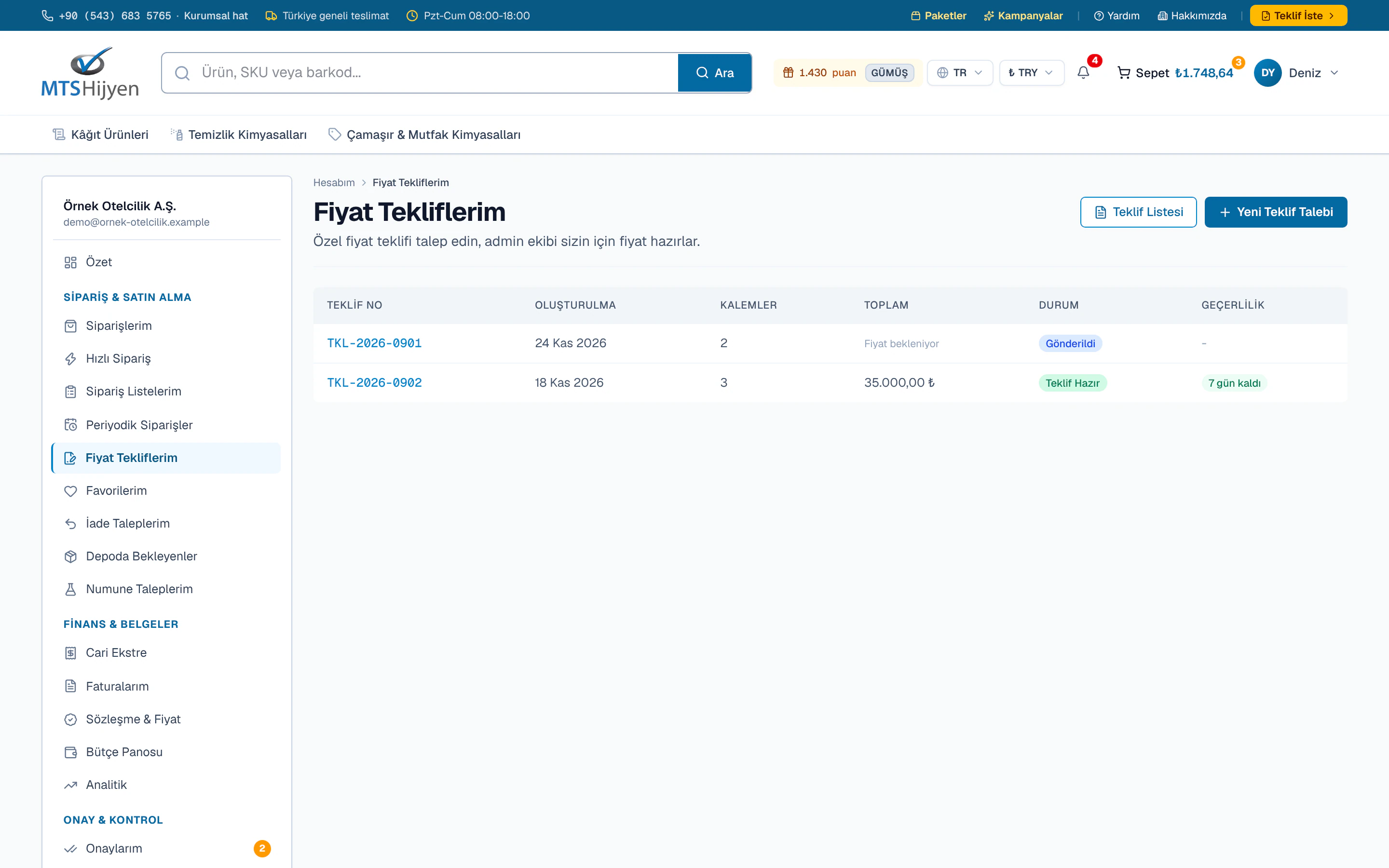
    Screenshot of the My Price Quotes page
  2. 3

    Follow the quote status

    The table shows the status of every request: Submitted, Under Review, Quote Ready or Accepted.

    Screenshot of the My Price Quotes page
My Sample Requests page
  1. 4

    Request a sample

    On the My Sample Requests page, click New Sample Request. Choose the product you want to try and send the form.
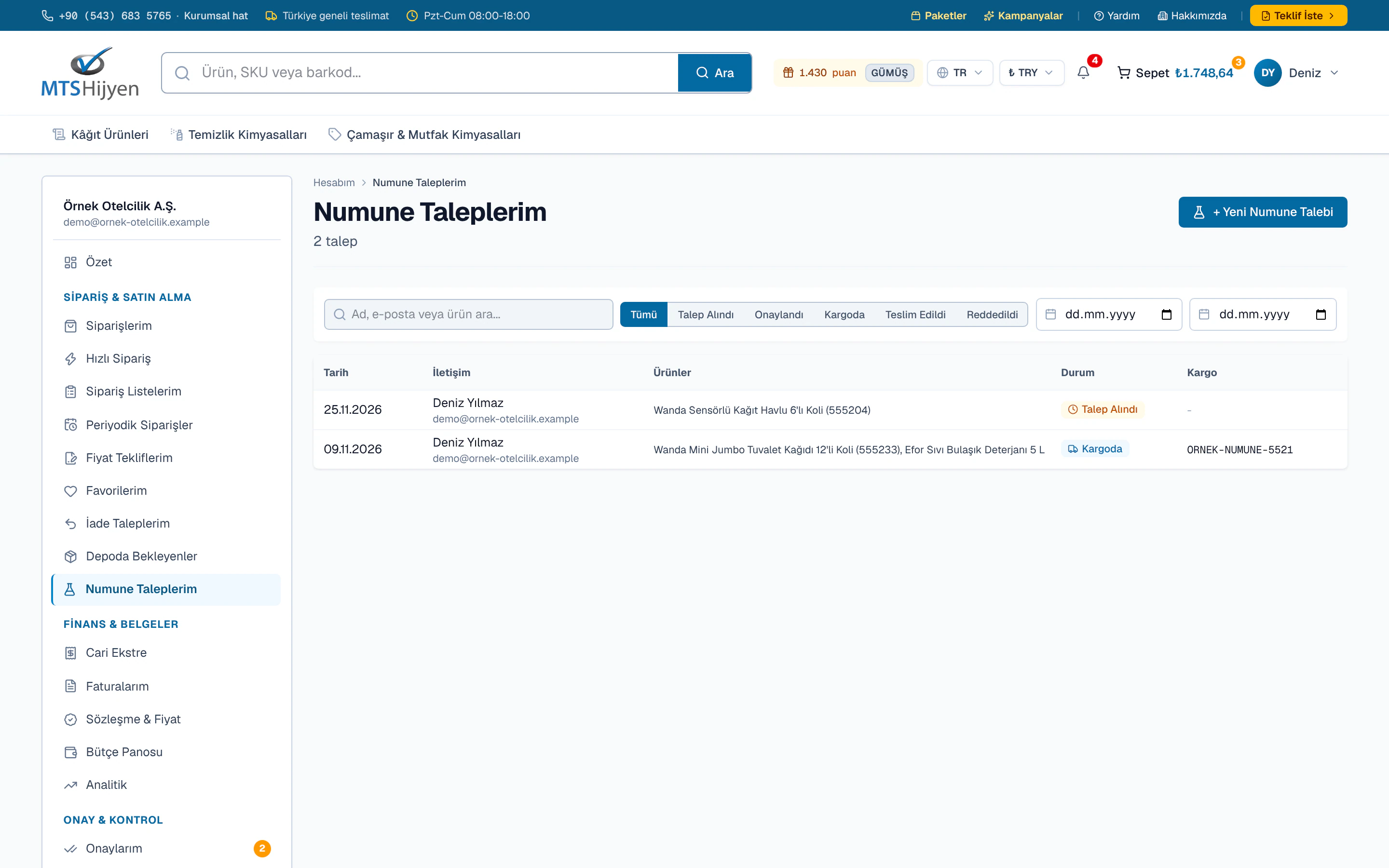
    Screenshot of the My Sample Requests page
  2. 5

    Track your sample request

    Follow the status of your request in the list on the same page.

    Screenshot of the My Sample Requests page
Try it now

This link takes you to the page. If you are not signed in, the sign-in page opens first.

Previous chapterRecurring ordersNext chapterApprovals and budget